> ## Documentation Index
> Fetch the complete documentation index at: https://companyname-a7d5b98e-closes-94-guidebook-more.mintlify.site/llms.txt
> Use this file to discover all available pages before exploring further.
# Using Tonviewer
Tonviewer is a TON Blockchain explorer that allows you to inspect blocks, transactions, contracts, and tokens, as well as analyze activity.
## High-level entities
High-level entities provide the foundation for exploring TON Blockchain, understanding and tracking operations.
They are essential for identifying transactions and tracing data flow across the network.
* [Accounts](/foundations/statuses) — the primary entities representing actors on the blockchain.
* [Addresses](/foundations/addresses/overview) — unique identifiers for accounts, showing balances and activity in Tonviewer.
* [Messages](/foundations/transaction) — instructions sent between addresses. In explorers, they reveal what actions are initiated and how they lead to transactions.
* [Transactions](/foundations/transaction) — records of executed messages. Explorers display their details linked to a specific address.
* [Blocks](/foundations/whitepapers/tblkch) — containers of transactions. In explorers, they expose block metadata and configuration parameters, allowing you to trace activity and understand how the blockchain operates.
## Analyzing operations
### Traces
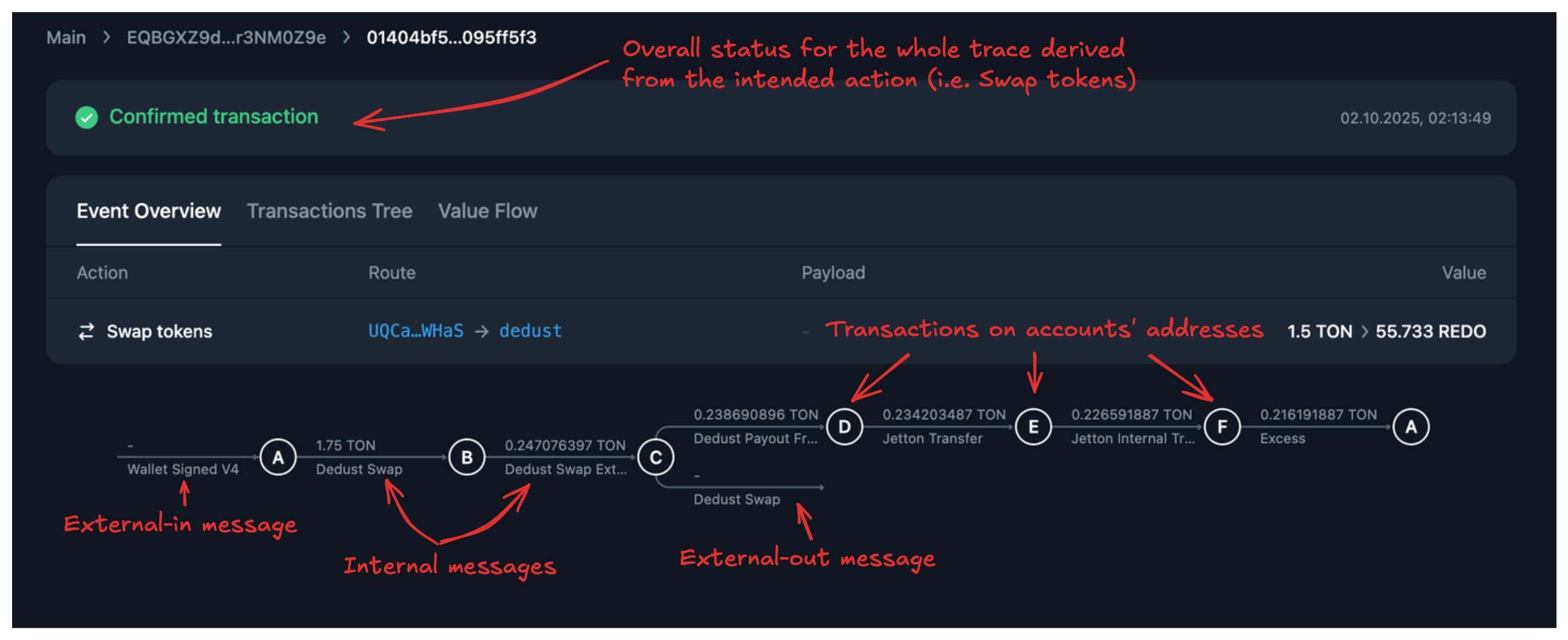
In Tonviewer, operations are visualized through traces.
A trace is a directed acyclic graph (DAG) where:
* transactions are nodes on an account's address
* messages are edges between addresses
 ### Steps to analyze an operation
1. **Identify the entry point**
Start with the external-in message that initiates the trace. It defines the intent of the operation, such as a transfer, swap, or staking action.
2. **Identify accounts**
Examine the accounts involved — wallet addresses, jetton wallets, jetton master wallets, and DEX contracts. It clarifies the role of each entity in the flow.
3. **Inspect messages**
For each edge, review its payload:
* value — amount of TON or jettons transferred
* opcode — instruction type
* payload — instructions
4. **Check transaction phases**
Each transaction executes in phases. In the compute and action phases, an exit code of 0 indicates success; a non-zero code signals an error.
5. **Find the failure point**
Even if all transactions succeed, failures can still occur due to message or payload constraints.
## Failed use cases
The following examples illustrate common operation failures in Tonviewer. Each case demonstrates how to systematically analyze traces to identify the failure point, even when transactions appear to be successful or partially executed.
### Jetton transfer
Analyze a [jetton transfer](https://tonviewer.com/transaction/d5d50c3e5bde493ddc7853f784bdff75a37bf89473e77ba8d04615323c7c8117) attempt.
### Steps to analyze an operation
1. **Identify the entry point**
Start with the external-in message that initiates the trace. It defines the intent of the operation, such as a transfer, swap, or staking action.
2. **Identify accounts**
Examine the accounts involved — wallet addresses, jetton wallets, jetton master wallets, and DEX contracts. It clarifies the role of each entity in the flow.
3. **Inspect messages**
For each edge, review its payload:
* value — amount of TON or jettons transferred
* opcode — instruction type
* payload — instructions
4. **Check transaction phases**
Each transaction executes in phases. In the compute and action phases, an exit code of 0 indicates success; a non-zero code signals an error.
5. **Find the failure point**
Even if all transactions succeed, failures can still occur due to message or payload constraints.
## Failed use cases
The following examples illustrate common operation failures in Tonviewer. Each case demonstrates how to systematically analyze traces to identify the failure point, even when transactions appear to be successful or partially executed.
### Jetton transfer
Analyze a [jetton transfer](https://tonviewer.com/transaction/d5d50c3e5bde493ddc7853f784bdff75a37bf89473e77ba8d04615323c7c8117) attempt.
 1. **Identify the entry point**
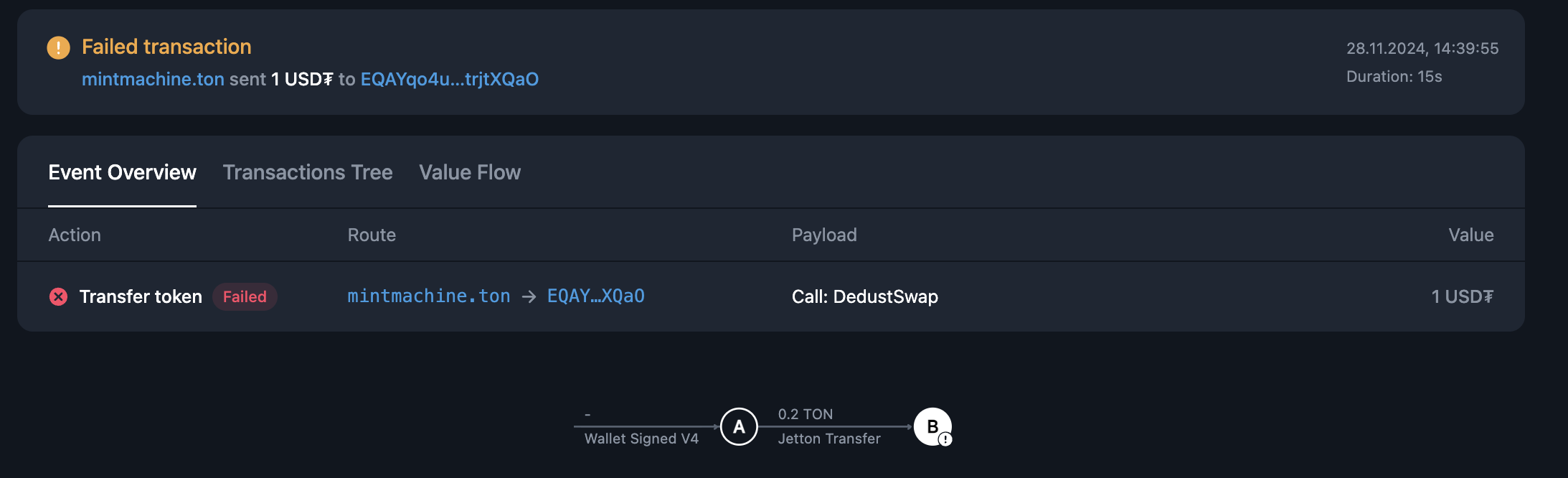
At point **A** (`mintmachine.ton`), an external-in message initiates the operation, instructing a jetton transfer.
2. **Identify accounts**
* A — sender's wallet contract (mintmachine.ton).
* B — jetton wallet contract governed by the jetton master.
3. **Inspect messages**
* A → B: jetton transfer message with TON attached to cover execution fees.
4. **Check transaction phases**
The transaction at **B** failed during execution, with a non-zero exit code.
5. **Find the failure point**
Exit code `48` per [jetton contract logic](https://github.com/ton-blockchain/jetton-contract/blob/main/contracts/op-codes.fc#L33) indicates that there isn't enough gas to complete the transfer.
The attached TON was insufficient to cover execution and forwarding, so the contract aborted the transfer.
### NFT transfer
Analyze an [NFT transfer](https://tonviewer.com/transaction/d8b5dbfe1c115178f47b486d03982159ec8abe684cdbe1c75587293e877564d4) attempt.
1. **Identify the entry point**
At point **A** (`mintmachine.ton`), an external-in message initiates the operation, instructing a jetton transfer.
2. **Identify accounts**
* A — sender's wallet contract (mintmachine.ton).
* B — jetton wallet contract governed by the jetton master.
3. **Inspect messages**
* A → B: jetton transfer message with TON attached to cover execution fees.
4. **Check transaction phases**
The transaction at **B** failed during execution, with a non-zero exit code.
5. **Find the failure point**
Exit code `48` per [jetton contract logic](https://github.com/ton-blockchain/jetton-contract/blob/main/contracts/op-codes.fc#L33) indicates that there isn't enough gas to complete the transfer.
The attached TON was insufficient to cover execution and forwarding, so the contract aborted the transfer.
### NFT transfer
Analyze an [NFT transfer](https://tonviewer.com/transaction/d8b5dbfe1c115178f47b486d03982159ec8abe684cdbe1c75587293e877564d4) attempt.
 1. **Identify the entry point**
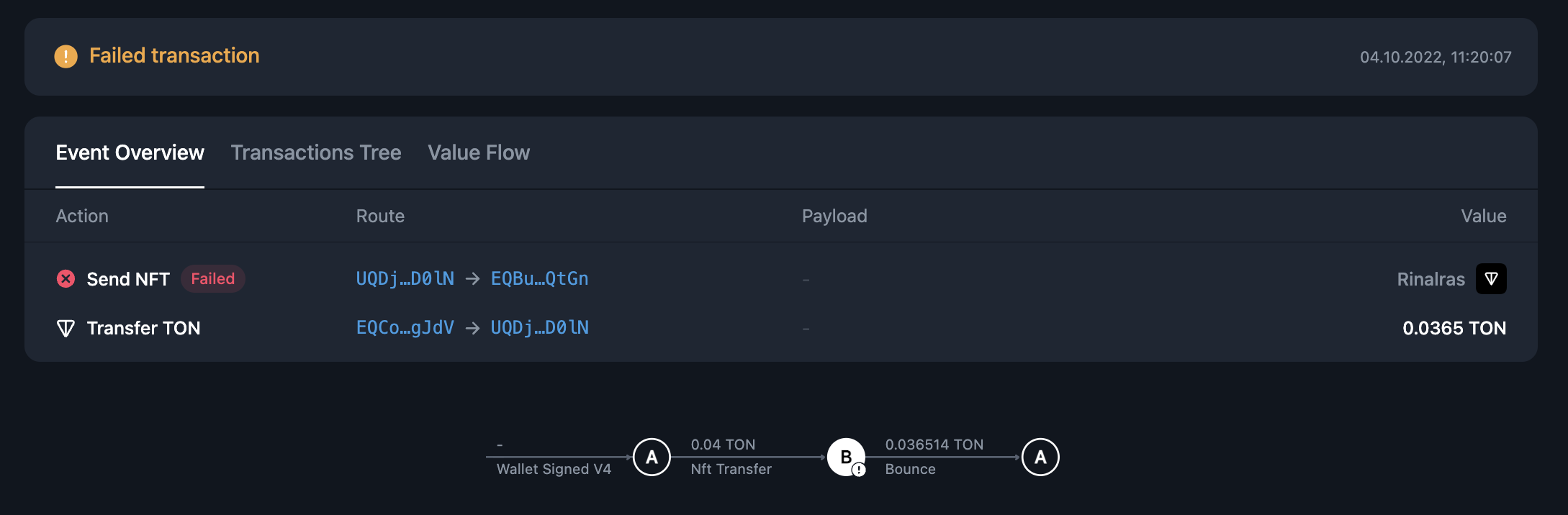
At point **A** (address `UQDj…D0lN`), the user’s wallet sends an **external-in** message to transfer an NFT.
2. **Identify accounts**
* A — the user's wallet.
* B — the NFT contract at address `EQCo…gJdV`.
3. **Inspect messages**
* A → B: NFT transfer message with 0.04 TON attached.
* B → A: bounce returning 0.0365 TON.
4. **Check transaction phases**
The transaction at **B** failed in the compute phase, with an exit code of `401`.
5. **Find the failure point**
According to the [NFT standard](https://github.com/ton-blockchain/token-contract/blob/main/nft/nft-item.fc#L65), exit code `401` means that the sender is not the owner of the NFT.
Because the ownership check failed, the contract rejected the transfer and returned the unused funds to **A**.
### DEX swap
Analyze a [token swap](https://tonviewer.com/transaction/fa8e119f8911d20bb078b9b81a3fc1f8ff2bcc723eda3ac7e873e97f455812e7) attempt from **DYX** to **pTON**.
1. **Identify the entry point**
At point **A** (address `UQDj…D0lN`), the user’s wallet sends an **external-in** message to transfer an NFT.
2. **Identify accounts**
* A — the user's wallet.
* B — the NFT contract at address `EQCo…gJdV`.
3. **Inspect messages**
* A → B: NFT transfer message with 0.04 TON attached.
* B → A: bounce returning 0.0365 TON.
4. **Check transaction phases**
The transaction at **B** failed in the compute phase, with an exit code of `401`.
5. **Find the failure point**
According to the [NFT standard](https://github.com/ton-blockchain/token-contract/blob/main/nft/nft-item.fc#L65), exit code `401` means that the sender is not the owner of the NFT.
Because the ownership check failed, the contract rejected the transfer and returned the unused funds to **A**.
### DEX swap
Analyze a [token swap](https://tonviewer.com/transaction/fa8e119f8911d20bb078b9b81a3fc1f8ff2bcc723eda3ac7e873e97f455812e7) attempt from **DYX** to **pTON**.
 1. **Identify the entry point**
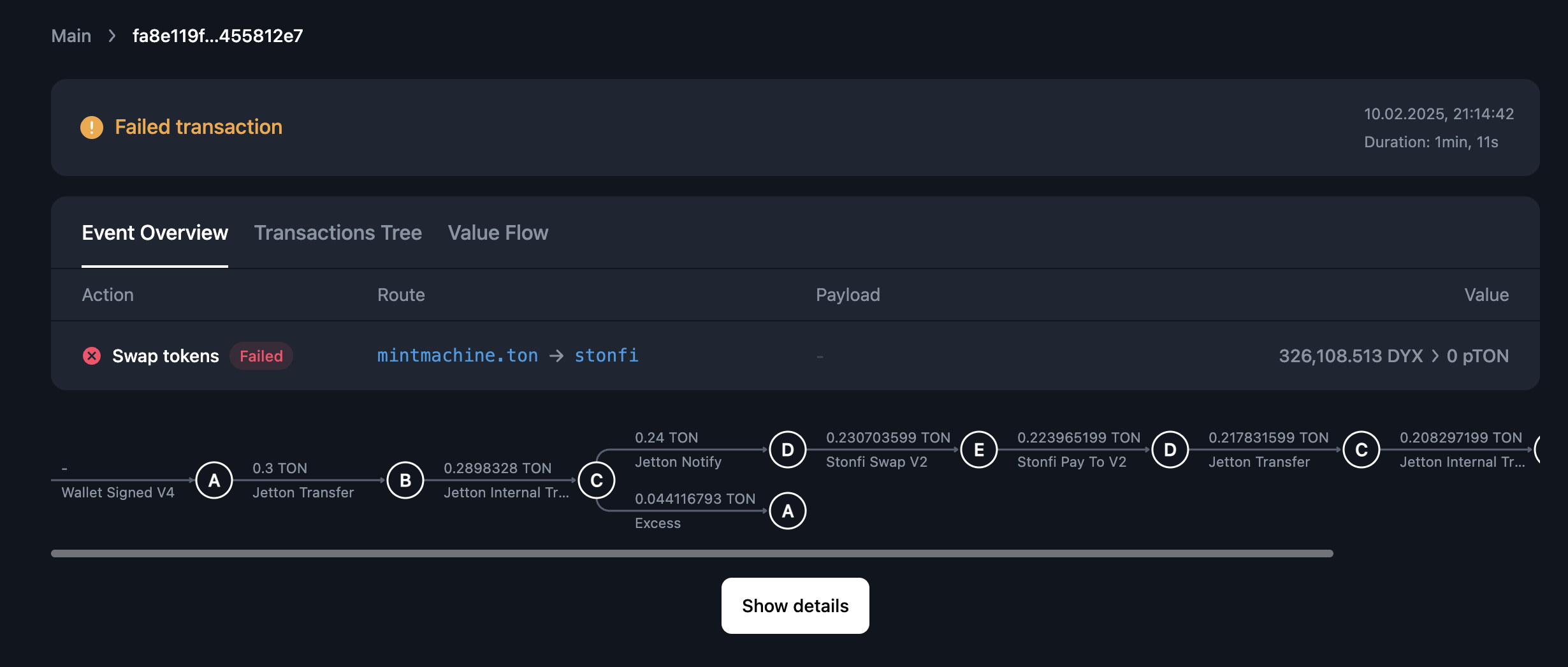
The trace begins at point **A** (the user’s `mintmachine.ton` contract). An external-in message initiates the swap attempt.
2. **Identify accounts**
* A — user's mintmachine.ton account, sending the initial funds.
* B — user's jetton wallet.
* C — DEX jetton wallet.
* D — DEX smart contract executing the swap.
* E — jetton master (minter) of the token.
3. **Inspect messages**
* A → B: 0.3 TON transferred via a jetton transfer.
* B → C: jetton internal transfer to the DEX wallet.
* C → D: swap request sent to the DEX contract.
* C → A: return of excess funds.
* D → E: request to the jetton master.
* E → D: reply with `exit_code: 962605456 (0x39603190)`.
4. **Check transaction phases**
Transactions in A, B, C, D, and E all completed with exit code 0. No phase errors were reported.
5. **Find the failure point**
The issue appears in the payload of **E → D**. According to [Ston.fi docs](https://docs.ston.fi/developer-section/dex/smart-contracts/v2/op-codes#transfer-exit-codes), the `exit_code: 962605456` corresponds to *Swap out token amount is less than provided minimum value*.
This explains why, despite all transactions succeeding, the swap reverted: the output did not satisfy the minimum slippage tolerance.
## Successful use case
Analyze a [token swap](https://tonviewer.com/transaction/b1dce2881224590a7c60e61594c68bd477f84fe81519b373da8fbed9c0269565) from **REDO** to **TON**.
1. **Identify the entry point**
The trace begins at point **A** (the user’s `mintmachine.ton` contract). An external-in message initiates the swap attempt.
2. **Identify accounts**
* A — user's mintmachine.ton account, sending the initial funds.
* B — user's jetton wallet.
* C — DEX jetton wallet.
* D — DEX smart contract executing the swap.
* E — jetton master (minter) of the token.
3. **Inspect messages**
* A → B: 0.3 TON transferred via a jetton transfer.
* B → C: jetton internal transfer to the DEX wallet.
* C → D: swap request sent to the DEX contract.
* C → A: return of excess funds.
* D → E: request to the jetton master.
* E → D: reply with `exit_code: 962605456 (0x39603190)`.
4. **Check transaction phases**
Transactions in A, B, C, D, and E all completed with exit code 0. No phase errors were reported.
5. **Find the failure point**
The issue appears in the payload of **E → D**. According to [Ston.fi docs](https://docs.ston.fi/developer-section/dex/smart-contracts/v2/op-codes#transfer-exit-codes), the `exit_code: 962605456` corresponds to *Swap out token amount is less than provided minimum value*.
This explains why, despite all transactions succeeding, the swap reverted: the output did not satisfy the minimum slippage tolerance.
## Successful use case
Analyze a [token swap](https://tonviewer.com/transaction/b1dce2881224590a7c60e61594c68bd477f84fe81519b373da8fbed9c0269565) from **REDO** to **TON**.
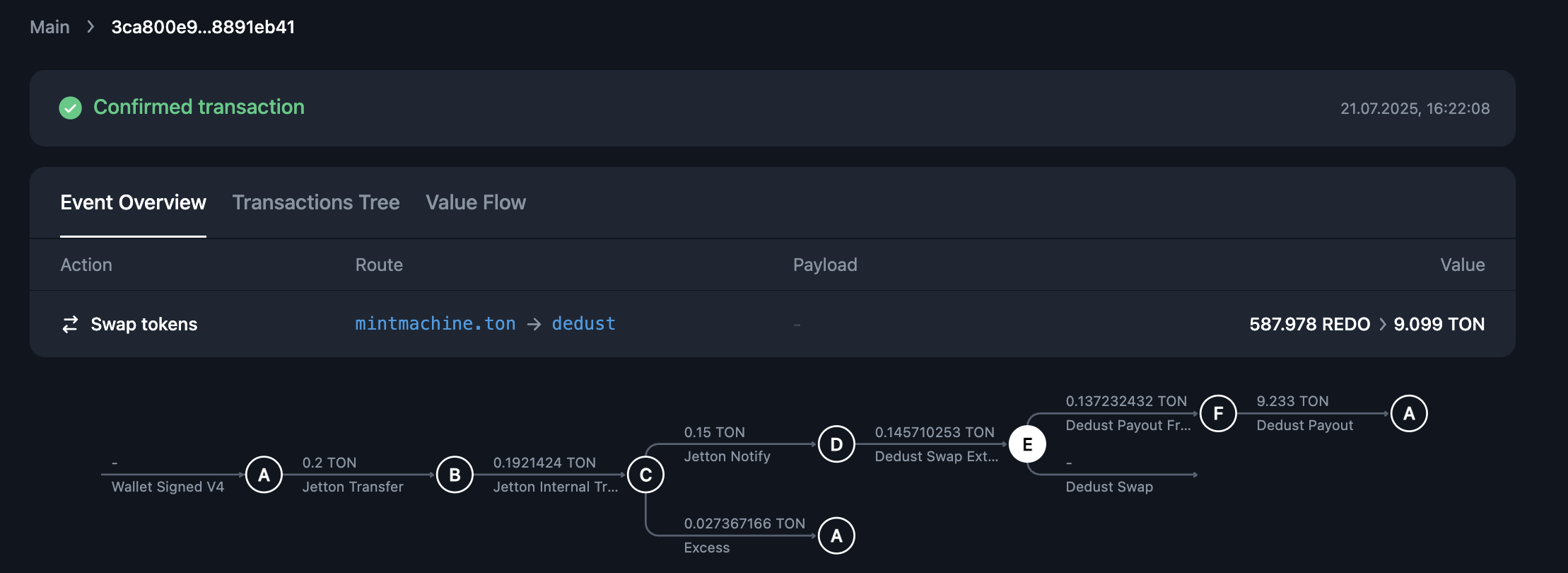 1. **Identify the entry point**
An **external-in** message arrives at point **A** (`mintmachine.ton`), initiating the swap.
2. **Identify accounts**
* A — `mintmachine.ton` account.
* B — user's jetton wallet.
* C — DEX jetton wallet.
* D — DEX smart contract executing the swap.
* E — jetton master (minter) of the token.
* F — DEX payout account (`mergesort.ton`).
3. **Inspect messages**
* A → B: 0.2 TON transferred via a jetton transfer.
* B → C: internal jetton transfer to the DEX wallet.
* C → D: valid amount forwarded to the DEX contract for swap execution.
* C → A: return of excess funds.
* D → E: request to the jetton master (minter) to mint/settle token movements.
* E → external-out: issues an **external-out message** — confirmation that the operation succeeded.
* E → F: sends an internal message to the payout pool account.
* F → A: forwards the swap result to the initiator (`mintmachine.ton`).
4. **Check transaction phases**
All transactions along the trace completed their phases without error, no warning markers; exit codes are `0`. There are no bounces, failed compute or action phases reported in the nodes.
5. **Find the failure point**
No failure point — the operation completed successfully.
## Debugging with retracer
Sometimes, reading messages and transaction phases is not enough.
A transaction may show *successful compute and action phases, exit codes of `0`, and no errors in messages* — yet still produce no effect on-chain.
In such cases, you need to trace the **TVM execution path**.
[Retracer](https://retracer.ton.org/) lets you replay the transaction and inspect what happened inside the virtual machine.
See [Debugging with TVM Retracer](/contract-dev/debug#debugging-with-tvm-retracer) for details.
1. **Identify the entry point**
An **external-in** message arrives at point **A** (`mintmachine.ton`), initiating the swap.
2. **Identify accounts**
* A — `mintmachine.ton` account.
* B — user's jetton wallet.
* C — DEX jetton wallet.
* D — DEX smart contract executing the swap.
* E — jetton master (minter) of the token.
* F — DEX payout account (`mergesort.ton`).
3. **Inspect messages**
* A → B: 0.2 TON transferred via a jetton transfer.
* B → C: internal jetton transfer to the DEX wallet.
* C → D: valid amount forwarded to the DEX contract for swap execution.
* C → A: return of excess funds.
* D → E: request to the jetton master (minter) to mint/settle token movements.
* E → external-out: issues an **external-out message** — confirmation that the operation succeeded.
* E → F: sends an internal message to the payout pool account.
* F → A: forwards the swap result to the initiator (`mintmachine.ton`).
4. **Check transaction phases**
All transactions along the trace completed their phases without error, no warning markers; exit codes are `0`. There are no bounces, failed compute or action phases reported in the nodes.
5. **Find the failure point**
No failure point — the operation completed successfully.
## Debugging with retracer
Sometimes, reading messages and transaction phases is not enough.
A transaction may show *successful compute and action phases, exit codes of `0`, and no errors in messages* — yet still produce no effect on-chain.
In such cases, you need to trace the **TVM execution path**.
[Retracer](https://retracer.ton.org/) lets you replay the transaction and inspect what happened inside the virtual machine.
See [Debugging with TVM Retracer](/contract-dev/debug#debugging-with-tvm-retracer) for details.